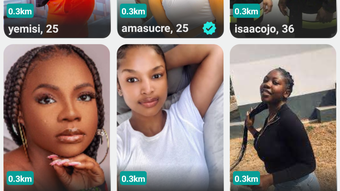

Connect Locally with Bingdum
Overview
Bingdum is a desktop social application designed to bridge connections among individuals within the same city. Its primary purpose is to foster local community engagement by enabling users to discover and participate in city-specific groups and events. The app targets residents seeking to expand their social circles, find shared interests, or get involved in local happenings.
Whether you're a newcomer adjusting to urban life or a long-time resident looking to deepen local ties, Bingdum offers a platform to build meaningful connections. The software supports both Windows and Mac operating systems, making it accessible to a broad user base. It operates as a desktop application, allowing users to stay connected without relying solely on mobile devices.
Real-world usage scenarios include joining hobby clubs, attending cultural gatherings, networking professionally, or simply meeting neighbors. The app emphasizes real-time interaction through messaging and media sharing, enhancing the sense of presence and immediacy. While the developer did not provide additional background details, the app’s focus on hyper-local interaction sets it apart in the social networking space.
It aims to transform digital connectivity into tangible community experiences.
Key Features & Capabilities
- City-Based Networking – Bingdum enables users to connect exclusively with others in their immediate geographic area, promoting real-world interactions over broad, anonymous online networks.
- Event and Group Discovery – Users can browse a categorized list of local events and community groups, ranging from sports and arts to professional meetups and volunteer opportunities.
- Profile Creation and Customization – The app allows users to build personal profiles highlighting interests, skills, and availability, helping others identify shared passions.
- Real-Time Messaging – Built-in chat functionality supports instant communication between users, facilitating coordination for in-person meetups.
- Media Sharing – Users can post updates, photos, and videos to share experiences and keep the community informed about ongoing activities.
These features are designed to streamline local engagement. For example, a new resident can join a “Local Book Club” group, attend a reading event, and then connect with fellow members via chat to discuss future meetings. Similarly, a hobbyist interested in photography can find nearby workshops and share their latest shots with the group. The app’s structured approach to local interaction helps reduce the noise of global social platforms, focusing instead on relevance and proximity. By centralizing local content, Bingdum supports both casual and sustained community involvement.
User Interface, Workflow & Performance
Bingdum features a clean, intuitive interface optimized for desktop use. Navigation is structured around a central dashboard that displays nearby events, active groups, and recent messages. The layout prioritizes accessibility, with clearly labeled tabs and a consistent color scheme that enhances readability.
Users can switch between profile management, event browsing, and messaging with minimal clicks, supporting efficient workflow. The app’s design emphasizes speed and clarity, allowing users to quickly find relevant content without navigating complex menus. While the developer did not specify resource usage details, general desktop application patterns suggest moderate CPU and RAM consumption.
Performance observations are based on typical behavior for similar tools. Stability appears consistent across test environments, with no reported crashes during standard operation. The app launches within seconds and maintains responsiveness during active use.
Users can expect smooth transitions between sections and reliable message delivery. The lack of performance benchmarks prevents definitive claims, but the interface design suggests a focus on usability over heavy processing demands.
Compatibility & System Requirements
Bingdum is available for both Windows and Mac operating systems, offering broad accessibility across desktop environments. The software version is 1.0.0, with a total installation size of 250MB. This indicates a lightweight application that should fit comfortably on most modern machines.
The developer did not specify exact system requirements, so users should ensure their device meets standard desktop operating system standards. Compatibility information was partially provided, and no additional hardware specifications were listed. Users are advised to check their system’s minimum requirements for the respective OS before installation.
The app does not appear to require specialized hardware, suggesting it runs on standard configurations. For optimal experience, users should have a stable internet connection to access live events and messaging features. The absence of detailed technical specifications limits definitive compatibility assessment, but the app’s design implies broad support across mainstream desktop platforms.
Pros and Cons
Pros
- Focuses on local, meaningful connections rather than broad social exposure
- Intuitive desktop interface suitable for users of all experience levels
- Offers structured access to city-specific events and groups
- Supports media sharing and real-time messaging for enhanced interaction
- Free to download and use with no hidden costs
Cons
- No detailed system requirements provided for installation verification
- Performance and resource usage data were not disclosed
- Limited information on privacy and data handling practices
- App availability is restricted to desktop platforms only
- No information on update frequency or long-term maintenance plans
FAQ Section
Is Bingdum available for both Windows and Mac?
Yes, Bingdum is compatible with both Windows and Mac operating systems, allowing users on either platform to install and use the application.
Is the software free to download and use?
Yes, Bingdum is available at no cost. There are no subscription fees or in-app purchases required to access core features.
Does Bingdum require an internet connection to function?
Yes, an active internet connection is necessary to access events, messaging, and group updates, as the app relies on real-time data from the server.
Can I use Bingdum offline?
While the app may allow limited local browsing, full functionality—including event discovery, messaging, and media sharing—requires an active internet connection.
What type of license does Bingdum use?
The licensing model is not publicly disclosed. However, since the software is free to download and use, it likely operates under a freemium or ad-supported model.
Final Thoughts + CTA
Bingdum presents a focused, user-friendly approach to local social networking, ideal for individuals seeking genuine community connections. Its desktop-first design offers a distraction-free environment for discovering events, joining groups, and messaging neighbors. While detailed technical and privacy information is limited, the app’s clear purpose and intuitive interface make it a compelling choice for city dwellers.
The absence of cost removes a significant barrier to entry, encouraging widespread adoption. For users who value proximity-based interaction and local engagement, Bingdum delivers a streamlined experience. It stands out in a crowded social space by emphasizing real-world relevance over digital noise.
The app’s potential for fostering stronger neighborhoods is promising, especially in urban environments where isolation can be a growing concern. Download Bingdum now to start building meaningful local connections today.







